Shift Schedule Overview
The shift schedule that works with you
Digital shift schedule directly in the Staffbase intranet – personalized, mobile-optimized, and always up-to-date for all employees
Overview
The Shift Schedule Overview brings the work schedule directly into the Staffbase intranet. No more bulletin board postings, Excel lists via email, or outdated PDF files. Employees see their personal shift schedule on their smartphone – always current, always available.
Why This Widget?
Shift schedules are the backbone of every production, logistics, and many other industries. But distribution is often chaotic:
- ✅ Always current: Changes are visible immediately – no more asking around
- ✅ Personalized: Everyone sees only their own schedule – clear and organized
- ✅ Mobile-optimized: Perfect for frontline workers without a desktop workstation
Key Features
1. Personalized Shift View
Each employee automatically sees their own shift schedule – filtered by department, location, or team:
- Weekly overview with all assigned shifts
- Color coding by shift type (early/late/night)
- Current day automatically highlighted
- Colleagues in the same shift visible
No confusion, no searching – the schedule is right there.
2. Mobile-First Design
Frontline workers often don’t have a PC workstation. The Shift Schedule Overview is therefore designed from the ground up for smartphones:
- Card view: Compact day cards with all important information
- Week strip: Quick overview of the entire week
- Touch-optimized: Swipe between days and weeks
- Offline capable: Last status available even without internet connection
3. Live Synchronization
The shift schedule updates automatically when changes are made in the source system:
- Connection to SAP HCM, ATOSS, Workday, or other HR systems
- Import from Excel or CSV for smaller teams
- Real-time push on schedule changes
- Timestamp shows last update
Result: Employees trust the schedule because it always shows the current status.
4. Team Overview for Managers
Shift leaders and team leads see the complete shift schedule for their team:
- Who is in which shift today?
- Where are there gaps or overbooking?
- Who has time off, who is on vacation?
- Dark mode option for night shift monitors
Typical Use Cases
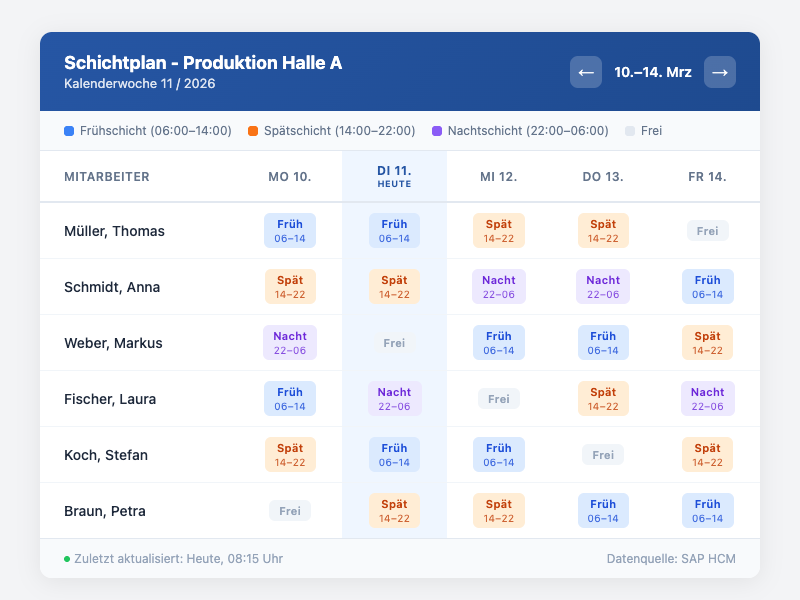
🏭 Production: Hall A Shift Schedule
“Early shift 06:00–14:00 in Hall A: Müller, Schmidt, Weber”
Production employees see their weekly plan with all shift assignments at a glance – including hall, shift times, and colleagues.
📱 Frontline: My Shift Schedule
“Hello Thomas! Your next shift: Tomorrow, late shift 14:00–22:00”
Each employee receives a personalized view with the current and next shift – optimized for smartphones.
🌙 Night Shift Monitor: Logistics Team
On large screens in the logistics hall, the dark mode shift schedule shows who is currently working and who is coming next.
🔄 Shift Swap Request
Employees can submit a shift swap request directly from the widget – without paper forms or emails.
Integration & Setup
The Shift Schedule Overview is set up in just a few minutes:
- Choose widget – Add from the widget gallery
- Connect data source – SAP, ATOSS, Excel, or API interface
- Configure view – Classic, Compact, or Dark Mode
- Activate personalization – Automatic filtering by user
- Publish – Done!
Optional: Enable notifications for schedule changes.
Design Options
View Modes
- Classic: Table with all employees and weekdays
- Compact/Personal: Mobile card view for individual employees
- Dark Mode: For night shift monitors and dark environments
- Team Grid: Columns per weekday with employee avatars
Color Coding
- Blue = Early shift
- Orange = Late shift
- Purple = Night shift
- Gray = Off / Vacation
- Custom colors per shift type configurable
Display Options
- Show/hide shift times
- Display colleagues in shift
- Show location / hall
- Calendar week navigation
Frequently Asked Questions
Where does the shift schedule data come from?
The widget can pull data from various sources: SAP HCM, ATOSS, Workday, Excel import, or via a REST API. Configuration is done once in the Widget Builder.
Can each employee only see their own schedule?
Yes, personalization uses the Staffbase user identity. Employees see only their own schedule. Managers can optionally enable the team view.
Does the widget work offline?
The last loaded shift schedule is cached locally. When there is no internet connection, the last known version is displayed – with a note about the timestamp.
How quickly are changes visible?
With API connection: immediately (real-time push). With Excel import: after the next import cycle (configurable, e.g., hourly).
Can employees swap shifts?
Yes, via the optional shift swap feature. Swap requests are forwarded to the team leader for approval.
Best Practices
📌 Dos
- Enable personalization: Employees want to see only their own schedule
- Think mobile-first: Most frontline workers use their smartphone
- Use color coding: Make shift types visually distinguishable
- Ensure timeliness: Automatic synchronization instead of manual updates
⚠️ Don’ts
- Display too much information at once (overwhelms mobile users)
- Publish shift schedules without personalization (privacy concerns!)
- Rely on manual Excel updates (they become outdated quickly)
- Forget the dark mode option for night shift areas
Screenshots
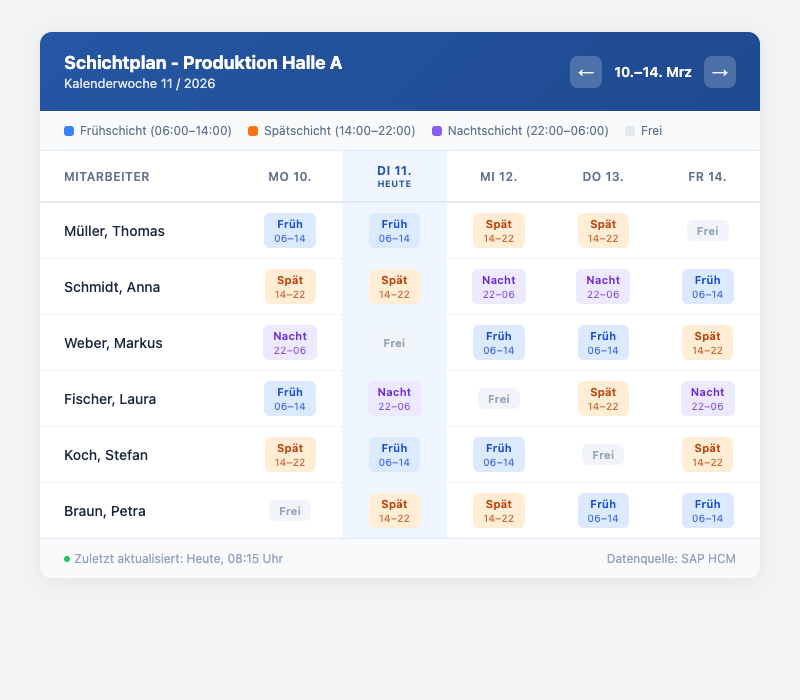
Classic weekly view with shift assignments for the entire team
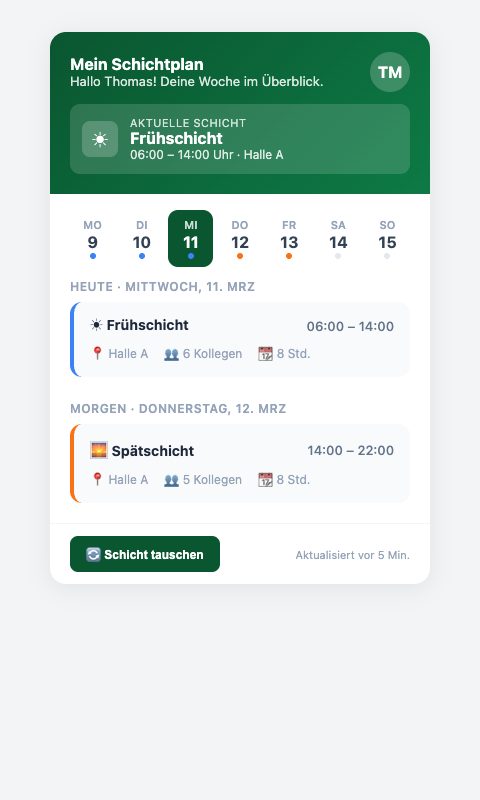
Mobile card view with personalized shift schedule
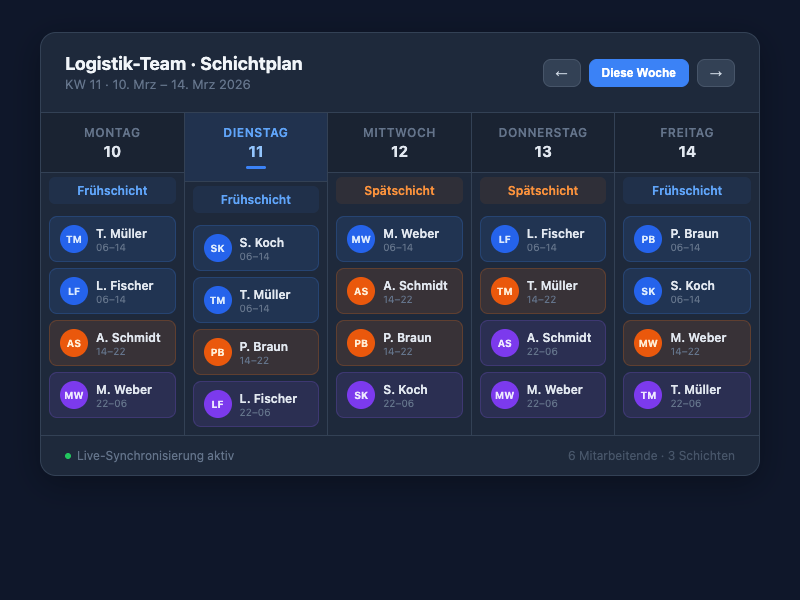
Dark mode variant with team overview and employee avatars
Use Cases
Production & Manufacturing
Display shift schedules for production halls with early, late, and night shifts clearly
Logistics & Warehousing
Warehouse employees see their deployment plan directly on their smartphone
Retail & Stores
Store teams coordinate with personalized work schedules
Healthcare
Shift schedules for nursing staff and hospital operations – mobile and always current
Key Features
- Personalized ViewEach employee sees only their own shift schedule – automatically filtered
- Mobile-OptimizedPerfectly readable on smartphones – ideal for frontline workers
- Live UpdatesChanges to the shift schedule are displayed immediately – no manual refresh needed
- System IntegrationAutomatic synchronization with SAP, ATOSS, Workday, or Excel
Available in
Personalized shift schedules and system integration from the Enterprise plan
Compare pricingIntegrations
Questions about the Shift Schedule Overview?
Our team is happy to help you personally