IT Service Status Board – live system status
All systems at a glance – no need to ask in Slack
Staffbase IT Status Widget: live status of internal systems in the intranet – with traffic light banner, auto-refresh and per-service details.
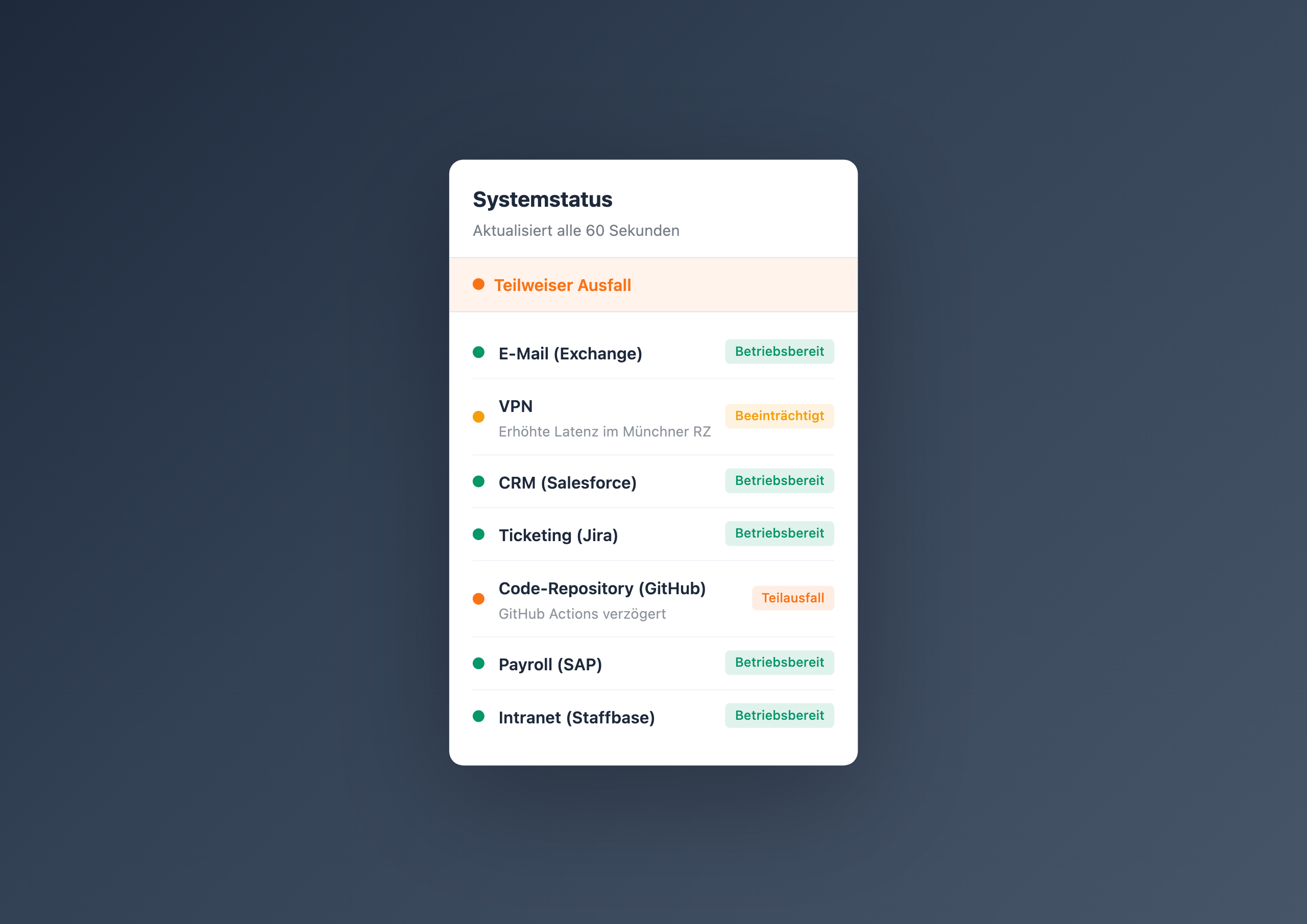
Overview
The IT Service Status Board shows the live status of all internal systems directly in the intranet. Email, VPN, CRM, ticketing – employees see at a glance whether everything is running or where things are struggling. The overall status banner automatically changes color when a service is affected.
Why this widget?
“Is email down?” – this Slack question costs five minutes every time, multiplied by every employee who asks. During an outage, ten people file IT tickets for the same problem. IT handles ten tickets instead of fixing the issue.
The IT Service Status Board breaks this cycle:
- Self-service instead of Slack – employees check the status themselves before filing a ticket
- Proactive communication – IT updates one entry in the Data Table, everyone sees it instantly
- Traffic light logic – green, amber, orange, red – no interpretation needed
- Auto-refresh – the widget refreshes every 60 seconds without reloading the page
Typical use cases
🖥️ Reduce helpdesk load
When employees check the homepage before writing a ticket and see that VPN is currently degraded, they save themselves the call. The IT team handles one problem instead of ten tickets.
📢 Communicate outages in real time
Exchange outage on Monday morning? Instead of an email blast that nobody reads (because email is down), the status is right there in the intranet – the channel that still works.
📊 SLA transparency for everyone
It’s not just IT that knows system status. Department heads see the status of their core tools and can adjust planning when a system is affected.
🔧 Announce planned maintenance
SAP update next Saturday? Simply set the status to “Planned maintenance” – with detail text and date. Employees are informed before they’re affected.
Integration & setup
Setup is straightforward:
- Create a Data Table in the Widget Builder (service name, status, details)
- Enter all relevant services (email, VPN, CRM, …)
- Drag the widget onto the intranet homepage
- Enter table GUID, customize colors and theme
- Publish
Connect External Systems
The IT Status Widget works out of the box with the built-in Data Table — but you can also pull service status directly from your existing monitoring system.
- Statuspage.io (Atlassian) – Automatically mirror service status and incidents from Statuspage to the intranet
- ServiceNow – Display ITSM data from ServiceNow in real time, including active incidents
- Datadog – Visualize monitoring status from Datadog directly on the intranet homepage
- PagerDuty – Import active alerts and service health from PagerDuty in real time
- Jira Service Management – Automatically update incident status from JSM
FAQ
Who updates the status?
The IT team updates the Data Table in the Widget Builder – either manually through the interface or automated via API connection to a monitoring tool.
Can the widget connect to a Statuspage.io instance?
Yes – as an alternative to the Data Table, the widget can query an external status API, e.g. the public API from Statuspage.io or Instatus.
Does the widget really auto-refresh?
Yes – data reloads every 60 seconds without employees having to refresh the page.
Can different locations have different boards?
Yes – simply create a separate Data Table per location and configure the widget with the corresponding GUID.
Related widgets
- Charts & Dashboards – visualize KPIs and metrics
- My Workday – personalized day starter
- Learning Path Tracker – training in the intranet
Use Cases
Reduce helpdesk load
Employees check status themselves instead of filing a ticket
Communicate outages
IT updates the status, everyone sees it instantly in the intranet
SLA transparency
Internal system availability visible to all departments
Change management
Announce planned maintenance before employees are affected
Key Features
- Overall status bannerGreen, amber, orange or red – instantly see if everything's running
- Per-service statusEach system with its own status dot and detail text
- Auto-refreshData reloads every 60 seconds
- Four status levelsOperational, Degraded, Partial outage, Major outage
- Light & dark modeAdapts to your intranet design
Related Widgets
Questions about the IT Service Status Board – live system status?
Our team is happy to help you personally