Idea Box Widget – crowdsourcing for employee proposals
Ask and you get answers. Show a status and you get participation.
Idea Box for Staffbase: employees submit ideas directly in the intranet, with status workflow from 'New' to 'Done'.
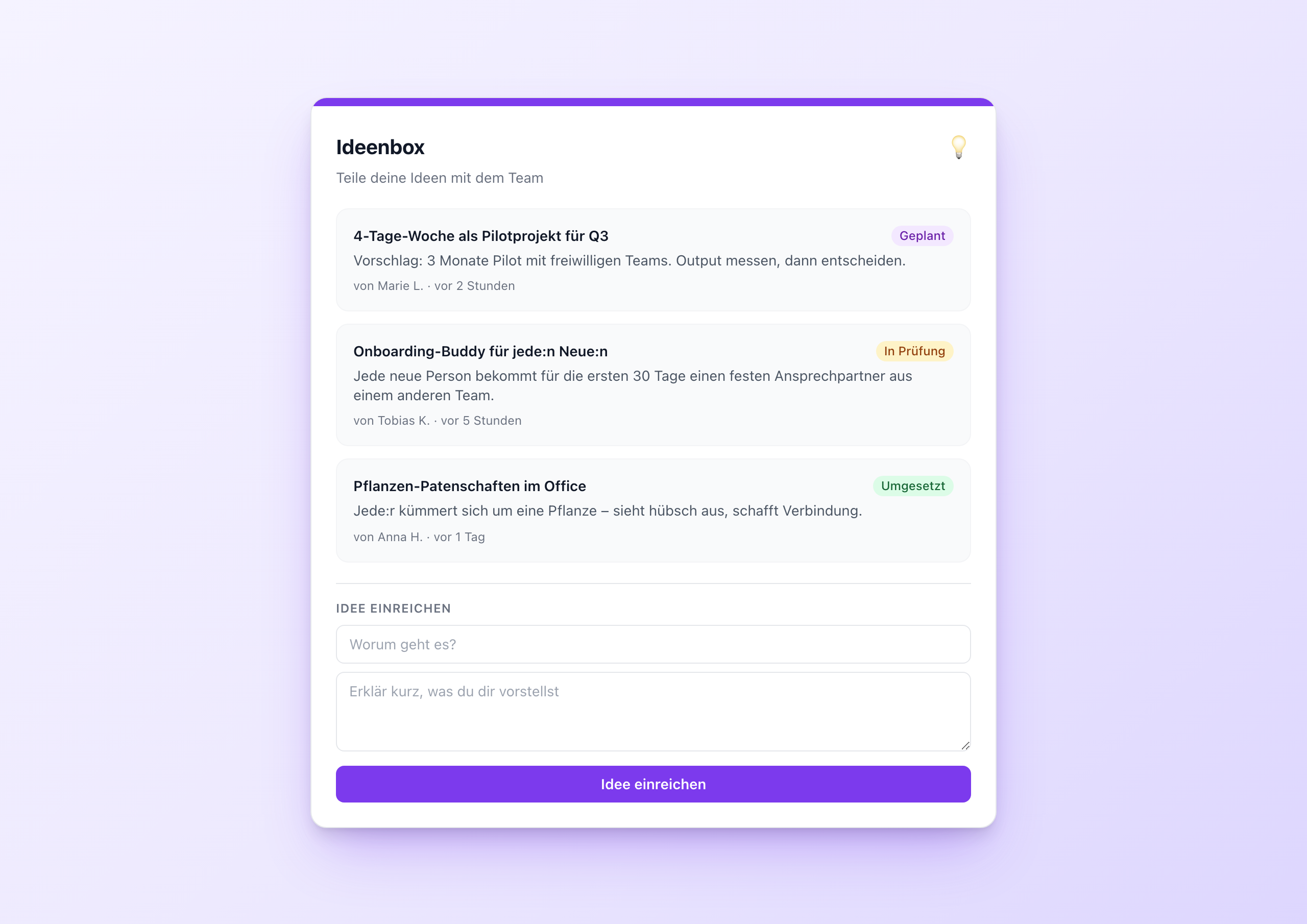
Overview
The Idea Box is crowdsourcing for internal proposals – with the crucial difference that every submitted idea has a visible status. Whoever submits an idea later sees what becomes of it: “New” → “In review” → “Planned” → “Done”. Exactly what’s missing in classic suggestion boxes that swallow ideas and never report back.
Architecture: Data Table with status workflow
Like Pulse Check and Kudos Wall, the Idea Box is a runtime user data widget with a Data Table backend. The table has five columns:
| Column | Type | Meaning |
|---|---|---|
idea_title | text | Title of the idea (max. 120 chars) |
description | text | Description (max. 500 chars) |
author | text | Filled by the widget from user.firstName + user.lastName |
status | text | new / review / planned / done |
submitted_at | date | Timestamp |
On submit, the widget POSTs a new row with status: 'new'. The status workflow is managed by an editor manually in the Data Table in the Widget Builder – a clear setup without approval logic in the widget itself.
Key features
1. Inline submit form
Two fields: title and description. The author comes from the user context. One click on “Submit idea” – and the idea lands in the list.
2. Four statuses with colored badges
- New (blue) – freshly submitted, not yet evaluated
- In review (amber) – being evaluated by innovation/management
- Planned (purple) – on the roadmap
- Done (green) – done, visible as a success
The colors come from Tailwind classes and are clean in dark mode too.
3. Sorted by submission date
The last N ideas (5–20, via slider) sorted by submitted_at desc. Whoever submits a new idea sees it at the top immediately.
Setup in 5 minutes
- Create a Data Table in the Widget Builder with the five columns above
- Copy the table GUID
- Add the Idea Box widget to a page
- Paste the GUID into the setting
- Publish, done
The status is set by the editor (or an innovation manager) later directly in the Data Table – no separate backend needed.
Configuration
7 settings, all editor-time:
- tableGuid – required
- Title, subtitle
- maxItems – slider 3–20
- showForm – submit form on/off
- accent_color – color picker
- theme – light or dark
Connect External Systems
The Idea Box works out of the box with the built-in Data Table — but you can also pull ideas directly from your existing project management system or sync them back.
- Jira – Manage ideas as issues in a dedicated Jira project and automatically mirror status to the intranet
- Monday.com – Maintain an ideas board in Monday.com, the widget shows the live status
- Asana – Employee suggestions as Asana tasks with automatic status updates
- Notion – Use a Notion database as a flexible alternative to the Data Table
- Microsoft Forms + SharePoint – Collect ideas via Forms, store in a SharePoint list, and display in the widget
FAQ
Can employees vote on ideas?
Not in the current showcase – that would be a second column and a second API call. An extended example with voting comes in a follow-up article.
Can ideas be submitted anonymously?
By default no – the widget reads user.firstName from the Staffbase context. If you want anonymity, set the author value in the template to a fixed string.
How do I moderate inappropriate ideas?
Via the Data Table in the Widget Builder. Editors with write permissions can delete individual rows or change the status.
Related widgets
- Kudos Wall – recognition with the same architecture
- Poll Widget – for structured polls
- Anniversaries Widget – for automatic anniversary recognition
Use Cases
Innovation programs
Structured crowdsourcing for new ideas from the team
Employee suggestion scheme
Classic improvement proposals digital, with visible status
Product development
Collect feature requests from sales or support
Key Features
- Inline submit formSubmit an idea directly in the widget – title and description, done
- Status workflow4 statuses: New, In review, Planned, Done – with colored badges
- Data Table backendEach idea as a persistent row, editor manages status in the table
- MultilingualStatus labels and UI in German and English
- Light & darkBoth themes with configurable accent color
Questions about the Idea Box Widget – crowdsourcing for employee proposals?
Our team is happy to help you personally