Hybrid Booking – desks & rooms in the intranet
Desk free? Room free? One click – booked.
Staffbase Hybrid Booking Widget: book hot desks and meeting rooms with one click – availability, your bookings and location filter right in the intranet.
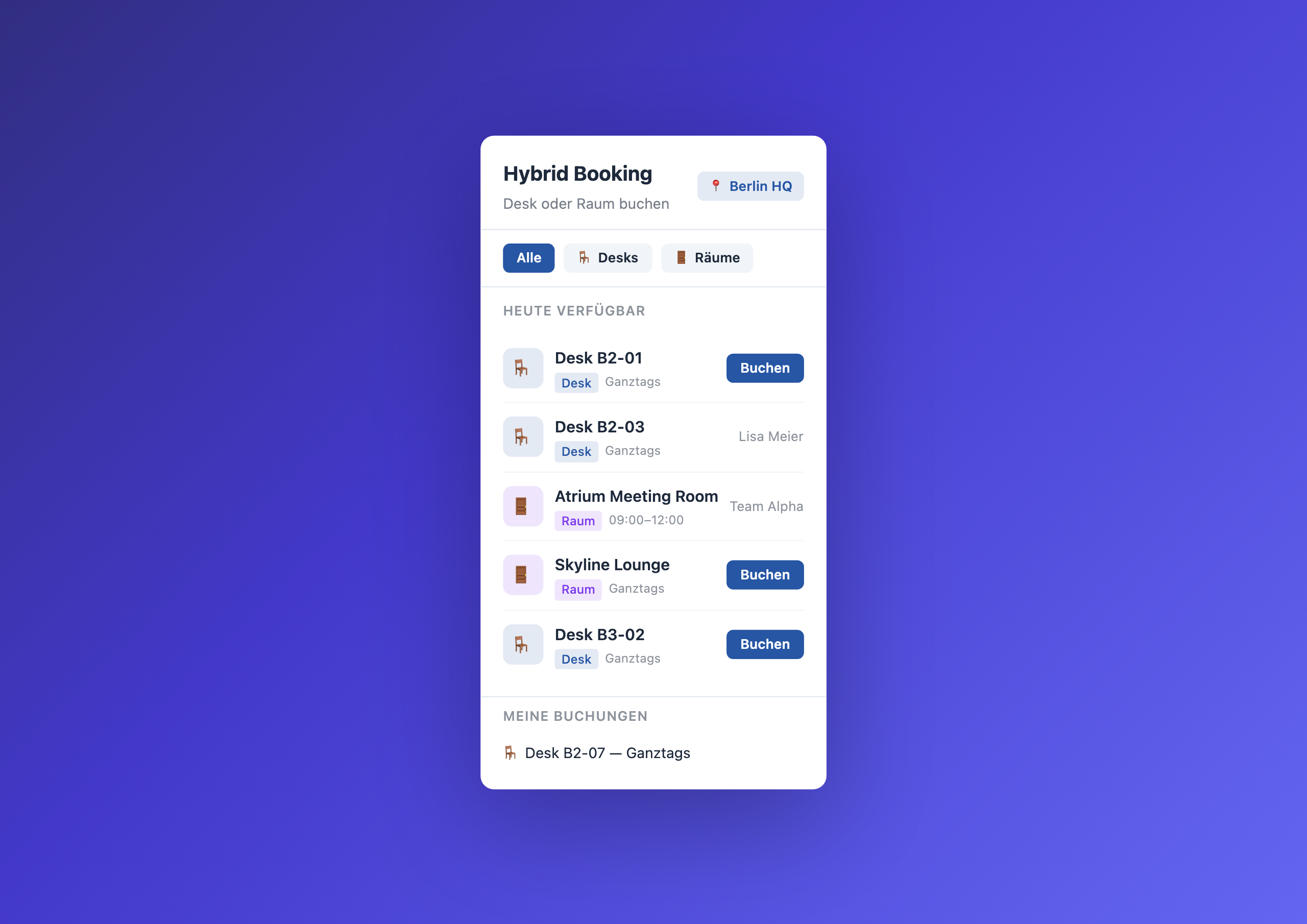
Overview
The Hybrid Booking Widget brings desk and room booking directly into the intranet. Employees see at a glance which hot desks and meeting rooms are free at their location today, and book with one click – no external tool, no Outlook calendar chaos.
Why this widget?
Hybrid work only works when employees know what to expect at the office. When the desk booking process means: open a separate tool, log in, select location, click floor, find desk, choose time slot, confirm – nobody books in advance. And the “team day” at the office becomes a searching-for-a-free-desk day.
The Hybrid Booking Widget makes it as simple as possible:
- Visibility – free desks and rooms right on the intranet homepage
- One click – name and email come automatically from the Staffbase user context
- Location scope – each widget shows only one location, no navigating through floors
- Your bookings – the bottom section shows employees their existing bookings
Typical use cases
🪑 Organize hybrid work
Employees check on their phone in the morning whether their favorite desk is free – and book it before heading out. No surprise on arrival.
🚪 Enable spontaneous meetings
A team discussion needs to happen quickly, but all Outlook calendars show “busy.” The widget shows actual room availability – and one click reserves the room.
📊 Understand space utilization
Facility management sees in the Data Table which desks are regularly booked and which sit empty. Data-driven decisions about space planning instead of gut feeling.
👥 Coordinate team days
The marketing team wants to be in the office together every Wednesday. Through the widget, everyone books adjacent desks – the office day becomes a real team day.
Integration & setup
Setup takes just a few minutes:
- Create a Data Table in the Widget Builder (resource, type, location, booking)
- Enter desks and rooms as rows
- Drag the widget onto the intranet homepage
- Enter table GUID and location
- Publish
Connect External Systems
The Hybrid Booking Widget works out of the box with the built-in Data Table — but you can also pull booking data directly from your existing workplace management system.
- Robin – Display desk and room availability from Robin in real time on the intranet
- Envoy – Import workplace experience data from Envoy directly into the booking widget
- deskbird – Visualize hybrid workplace data from deskbird live on the homepage
- Eptura Engage – Automatically sync room bookings and desk sharing from Eptura Engage
- Microsoft Bookings – Manage bookings from Microsoft 365 directly in the intranet
FAQ
What happens if two people book the same desk at the same time?
The second booking technically goes through, but on the next widget reload the person sees the desk is already taken. This is acceptable for showcase use – for production environments a server-side conflict check is recommended.
Can bookings be cancelled?
Yes – editors can delete individual booking rows via the Data Table in the Widget Builder. In-widget cancellation is available as an extension.
Does the widget support recurring bookings?
The current setup handles single daily bookings. Recurring bookings can be implemented via automated import into the Data Table.
Can multiple locations be shown in one widget?
Each widget is filtered to one location. For multiple locations, simply place multiple widget instances on different intranet pages.
Related widgets
- Parking Management – book and manage parking spaces
- My Workday – personalized day starter
- IT Service Status Board – system status at a glance
Use Cases
Organize hybrid work
Employees book their desk before heading to the office
Find meeting rooms spontaneously
See free rooms and book instantly – no Outlook calendar chaos
Understand space utilization
Facility management sees in the Data Table how spaces are used
Coordinate team days
Teams book side by side so the office day is actually a team day
Key Features
- Real-time availabilityInstantly see which desks and rooms are free today
- One-click bookingBook without a form – name and email come automatically
- My bookingsYour bookings at a glance in the bottom section
- Location filterEach widget shows only the configured location
- Desk & room separatedColor-coded badges and filters for desks and meeting rooms
Questions about the Hybrid Booking – desks & rooms in the intranet?
Our team is happy to help you personally