Charity Counter – donations in the Staffbase intranet
Achieve more together – every donation visible
Staffbase Charity Counter Widget: donation campaigns with progress bar, donor list and countdown – make corporate giving visible.
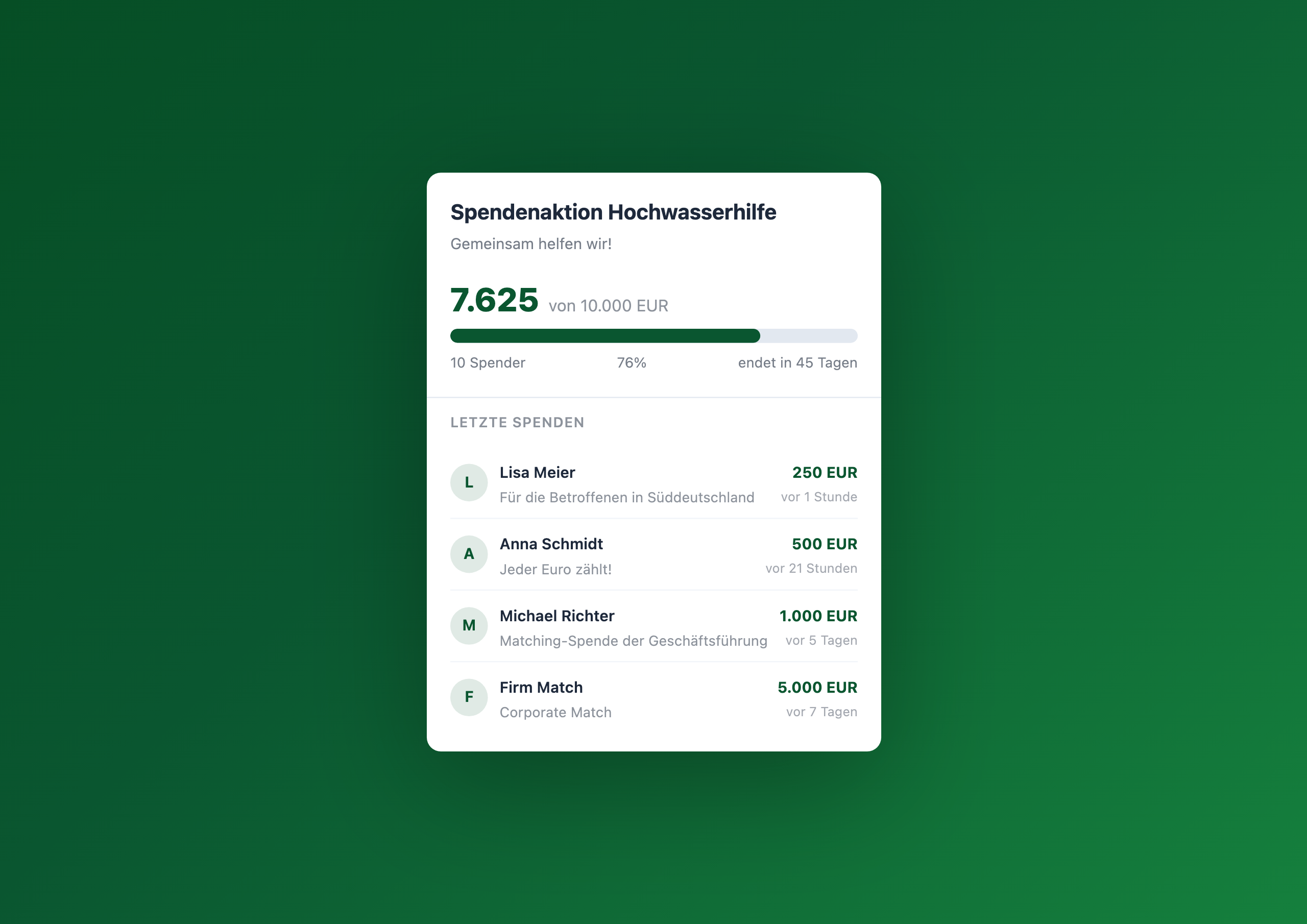
Overview
The Charity Counter makes donation campaigns visible in the intranet. Employees see the current donation total, the campaign goal, recent donors and a countdown to the end of the campaign – all at a glance, right on the homepage.
Why this widget?
Corporate social responsibility campaigns rarely fail due to lack of good will. They fail due to lack of visibility. When fundraising runs in a separate tool that employees only open once a week, the momentum effect is missing: the experience that colleagues are participating and the total is growing.
The Charity Counter solves exactly this problem:
- Visibility – the progress bar on the homepage shows every day how close the goal is
- Community spirit – the donor list shows who’s already contributed
- Urgency – the countdown motivates action now instead of tomorrow
- Transparency – every dollar is traceable, from day one to the celebration banner
Typical use cases
🌊 Disaster relief
Floods, earthquakes, wildfires – when quick help is needed, you need a tool that’s ready instantly. The Charity Counter is configured in two minutes and collects donations from the first second.
🎄 Annual CSR campaign
Holiday giving, charity run, giving week – recurring campaigns benefit from visible progress. Employees see that the campaign is alive and are more likely to join.
🤝 Matching programs
Leadership doubles every employee donation? The counter makes the match visible – nothing motivates more than “your fifty becomes a hundred.”
🏃 Volunteer hours
Not every campaign counts money. Volunteering hours, collected food or planted trees – the widget counts any unit you configure.
Integration & setup
Setup takes just a few minutes:
- Create a Data Table in the Widget Builder (donor, amount, timestamp)
- Drag the widget onto the intranet homepage
- Enter table GUID, donation goal and currency
- Optional: set deadline and enable donor list
- Publish
Connect External Systems
The Charity Counter works out of the box with the built-in Data Table — but you can also pull donation data directly from your existing giving platform.
- Benevity – Automatically visualize donation campaigns from Benevity in the intranet
- YourCause (Blackbaud) – Display employee giving data from YourCause in real time
- PayPal Giving Fund – Track PayPal donations in the counter in real time
- Stripe – Automatically add Stripe donation payments to the fundraising total
FAQ
Can employees donate directly in the widget?
The widget displays the campaign status. The actual donation goes through the channel of your choice – bank transfer, PayPal link or an external donation form. The amounts are recorded in the Data Table.
Does the widget support different currencies?
Yes – the currency is configured as an ISO code (EUR, USD, CHF etc.) and displayed in localized format.
What happens when the donation goal is reached?
The widget automatically displays a celebration banner with a success message. The progress bar stays at 100%.
Is the donor list GDPR-compliant?
The donor list shows only the first name and last name initial. Anyone wanting to donate anonymously can enter an alternative name. The data lives in the Data Table and is subject to the same access controls as all Widget Builder data.
Related widgets
- Kudos Wall – make recognition visible
- Poll Widget – collect quick feedback
- Pulse Check – weekly mood check-in
Use Cases
Disaster relief
Quick fundraising for floods, earthquakes or other crises
Annual CSR campaign
Holiday giving, charity run or giving week with visible progress
Matching programs
Leadership doubles every donation – the counter makes the match visible
Volunteer hours
Track volunteering hours instead of money – the widget counts both
Key Features
- Live progress barDonation total and goal progress visible in real time
- Donor listRecent donations with names, amounts and personal messages
- Campaign countdownAutomatic countdown to campaign end
- Localized currencyEuro, dollar, franc – matching your location
- Celebration modeAutomatic banner when the donation goal is reached
Questions about the Charity Counter – donations in the Staffbase intranet?
Our team is happy to help you personally