From Cafeteria to Parking: Workplace Management Widgets in Action
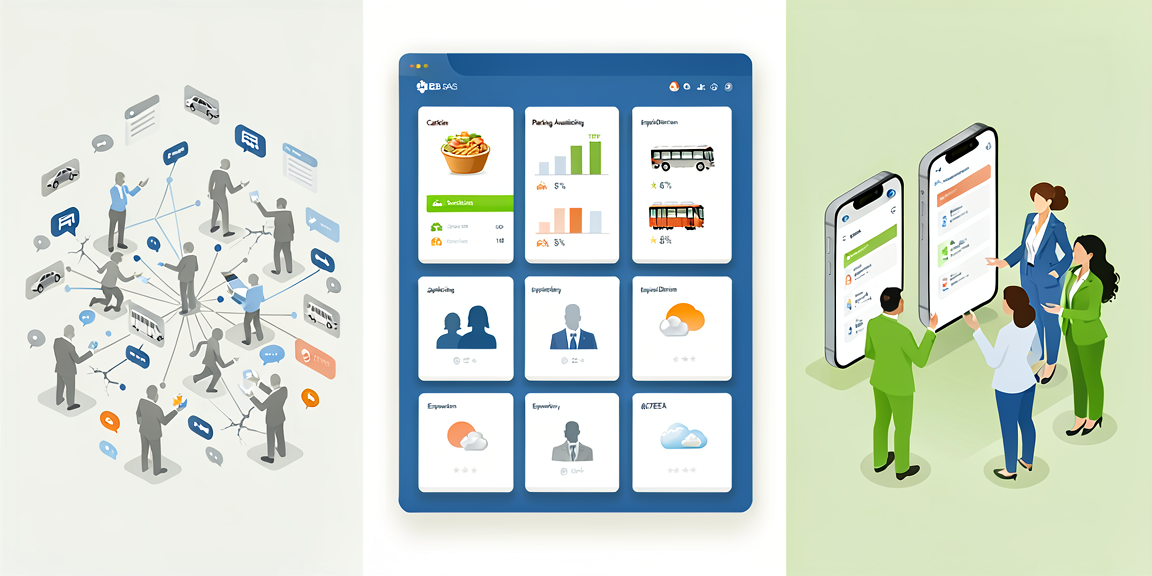
A good workplace runs on many small details: What’s for lunch? Is there a parking spot left? When does the next bus leave? Today, these answers live on different websites, in emails, or in separate apps. Workplace management widgets bring them together in the place your employees already visit every day: the Staffbase intranet.
The Starting Point: Information Scattered Everywhere
In most companies, the daily reality looks like this:
- “What’s for lunch today?” – Check the cafeteria website
- “Is there still a parking spot?” – Email facility management
- “When’s my bus coming?” – Open a separate app
- “Where does Max from IT sit?” – Search the phone list
Four everyday questions, four different systems. That costs time and causes frustration, especially for new employees who are still getting oriented.
1. Cafeteria Menu: The Classic That Does More Than You’d Expect
The Cafeteria Menu Widget shows the meal plan – obviously. But with a few thoughtful additions, it becomes the most-visited widget on your intranet.
Core Features:
- Weekly overview
- Vegetarian and vegan options clearly marked
- Allergens and nutritional values listed
- Prices at a glance
Getting More Out of It:
Build in a feedback loop. A quick vote after lunch (“How was today’s meal?”) gives the cafeteria team usable feedback.
"How was today's lunch?"
👍 Delicious  |  😐 Okay  |  👎 Better next time
Let employees mark favorites. They save their preferred dishes and get notified when those return to the menu.
Enable pre-ordering. In companies with 300+ employees, a pre-order feature noticeably reduces wait times and food waste.
Putting It in Perspective:
If a cafeteria widget replaces the daily visit to an external website, that saves each person maybe three to five minutes a day. Sounds small, but for 500 employees it adds up to over 30 hours daily. The bigger impact is qualitative, though: fewer questions at reception, happier employees.
2. Parking Management: No More Searching
Parking spaces are scarce at many companies. A parking widget brings order to a topic that eats up a surprising amount of work time.
Core Functions:
Real-time Availability
Campus North:    [████████░░] 8/10 occupied
Campus South:    [██████░░░░] 6/10 occupied
Underground:     [██████████] 10/10 occupied
Booking logic: Daily bookings for flexible work, permanent bookings for regular staff, a waiting list when fully booked, and push notifications when a spot opens up.
Also possible: QR code check-in at parking spots, EV charging station status, prioritization of accessible parking, and occupancy analytics for facility management.
Practical Example: Hybrid Work
In companies with flexible work models, occupancy fluctuates heavily. Monday through Wednesday the lots are often full; Thursday and Friday many spots sit empty. The widget can recognize these patterns and make suggestions: “Tomorrow still 5 spots free!” – helping employees plan their week.
3. Public Transport and Shuttle Tracker: The Commute
The public transport widget brings real-time transit information directly into the intranet.
What it does: Live departure times from the nearest stop, delays in real-time, route planning to your office location, and – if available – a company shuttle tracker with GPS positioning.
This is especially useful at locations outside city centers, during shift changes in production facilities, or for new employees during onboarding.
An Outlook calendar integration is also possible:
Next appointment: 2:00 PM, South location
Bus in 12 min → On-time arrival at 1:50 PM
Alternative: Train in 8 min (faster!)
4. Employee Directory: Who Sits Where?
Every company has a digital phone list. An employee directory widget goes well beyond that.
Location-based Search:
"Who's in Munich office today?"
→ 47 people
→ Filter: Department, Team, Function
Org Chart Visualization:
Hierarchies at a glance, direct contact options, and visible backup arrangements.
Communication Directly from the Directory:
Click-to-call via MS Teams or Zoom, send email, check calendar availability, or start an instant message – all without switching systems.
Hybrid Work View:
Employee map shows:
Home Office (today)
Munich Office (tomorrow)
Business Trip (Fri)
Everyone can see at a glance whether a colleague is available and where they’re working.
5. Weather Widget: Simple but Underestimated
The weather widget sounds trivial but has surprisingly many practical uses:
- Facility Management: Prepare winter road service on time
- Construction Coordination: Plan weather-dependent work
- Employee Wellbeing: Activate the running group when the sun is out
- Commute Planning: Leave earlier in extreme weather
For companies with multiple locations, the widget shows weather for each site – useful when you have a meeting at another office.
Widgets Become More Valuable When They Work Together
A single widget solves a single problem. It gets genuinely interesting when several widgets work together and cover the entire workday:
7:00 AM → Weather check: Rain → Car instead of bike
7:30 AM → Parking widget: Still 3 spots free → Book quickly
11:30 AM → Cafeteria widget: Vegetarian curry → Pre-order
4:30 PM → Public transport widget: Bus in 5 min → Time to leave
Everything from one platform, no switching between apps and websites.
Technical Implementation
All workplace management widgets can be set up without coding. They support API connections to existing systems, are optimized for the Staffbase app, and are GDPR-compliant.
Setup time: 10 to 30 minutes per widget, depending on the data source and desired configuration.
What Does It Actually Deliver?
Hard numbers for workplace widgets are difficult to generalize because the impact depends heavily on company size and existing infrastructure. From our customer projects, however, we see typical patterns:
Quantitatively, companies report fewer support tickets to facility management after rollout, because standard questions (“When does the bus leave?”, “What’s for lunch?”) are answered directly in the widget. Intranet usage often increases measurably because there’s a new daily reason to open the platform.
Qualitatively, teams report less daily friction, shorter decision paths, and an overall more modern employer experience.
Honestly: a single weather widget won’t change everything. But the combination of four or five workplace widgets that accompany the entire workday makes a noticeable difference.
Frequently Asked Questions
Q: Can widgets be customized? A: Yes, all widgets are customizable in design and functionality.
Q: Which APIs are supported? A: Standard APIs for HR systems, cafeteria software, parking management, public transport data, and other specialized systems.
Q: What about data privacy? A: All widgets are GDPR-compliant, with data hosted in EU data centers.
Q: Are there mobile apps? A: Widgets are fully integrated into the Staffbase mobile app.
Conclusion: Small Widgets, Big Everyday Impact
Workplace management widgets don’t solve major strategic challenges. But they remove the daily small friction points that, taken together, cost a lot of work time and patience. When the cafeteria menu, parking status, and bus schedule are directly available in the intranet, the platform becomes a tool employees genuinely want to use every day.
Next Steps:
- Find out which workplace questions come up most often at your company
- Start with one or two widgets that address the biggest pain point
- Collect feedback and expand step by step
Ready for the next step?