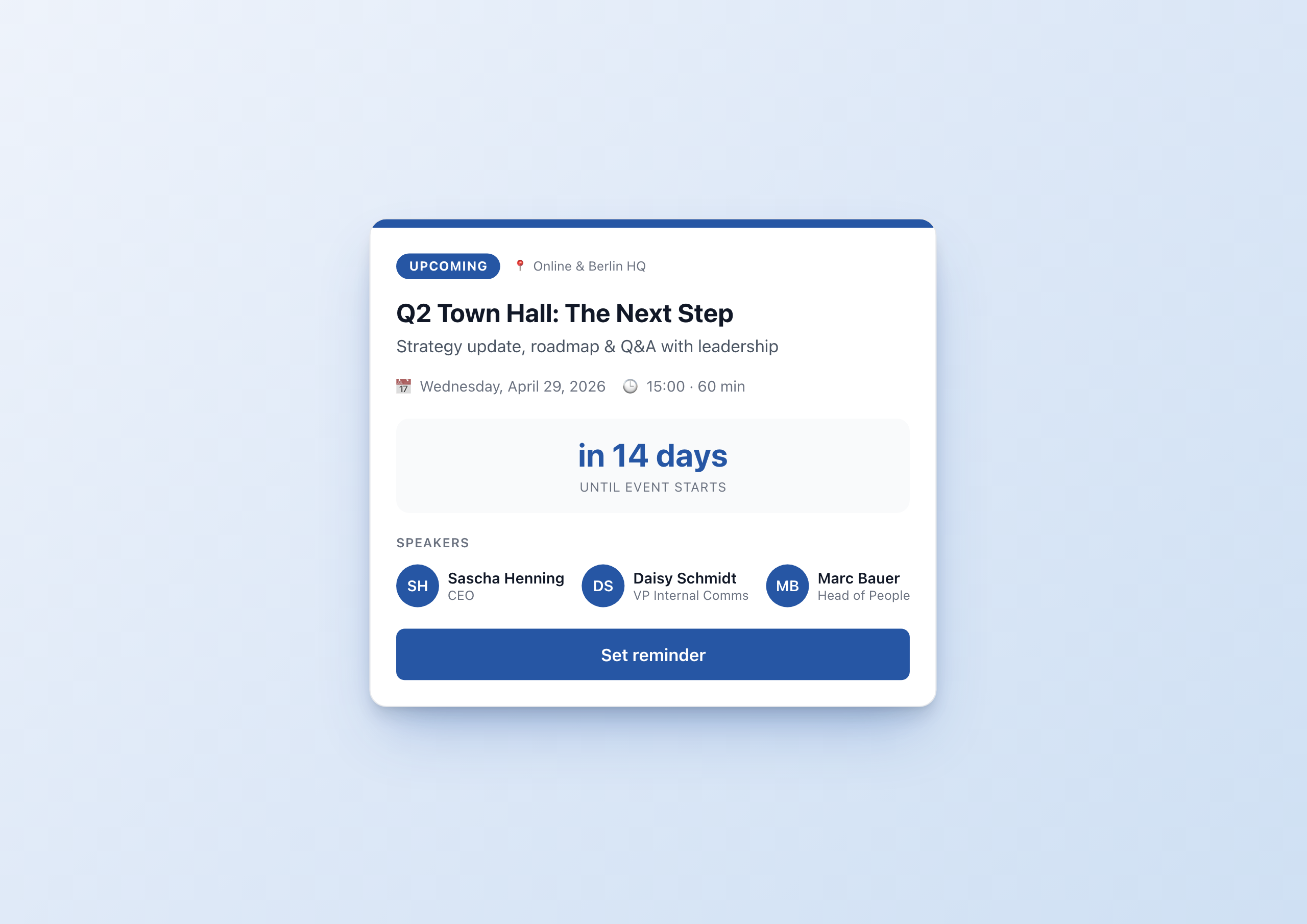
Town halls are the most important internal event format. Strategy updates, Q&A with leadership, big announcements – when everyone needs to be informed at the same time, that usually happens via live broadcast. And yet town halls are often poorly staged: an email invite, a calendar entry, a stream link buried somewhere in the intranet, and after the event the recording disappears into a SharePoint depth no one ever digs out again.
The Town Hall Live Hub Widget solves that with one widget that covers three phases – without the editor having to switch layouts in between.
Three phases, one widget
Before the event, your team wants to know when it starts. During the event, they want to know how to join. After the event, they want to find the replay. Three needs that, in most intranets, are spread across three different places: news article, stream tool, document library.
With the Town Hall widget, there is only one touchpoint. A dropdown switches between upcoming, live and replay:
- upcoming shows a localized countdown (“in 14 days”), the speaker lineup, and a “Set reminder” button.
- live turns on a pulsing red indicator, shows a live viewer counter, and swaps the CTA to “Join now”.
- replay turns the status badge gray, hides the countdown, and replaces the CTA with “Watch replay”.
Each state has its own layout – the widget reads the right branding colors from the settings and uses your accent color for avatar initials and buttons.
Localization that just works
International teams are the stress test for town hall tools. The widget uses the Widget Builder’s datetime helper with to_relative=true and with_locale=widget.contentLanguage. Concretely:
- English-speaking employees see “Wednesday, April 29, 2026” and “in 14 days”
- German-speaking employees see “Mittwoch, 29. April 2026” and “in 14 Tagen”
- The time is adjusted with
with_timezone=browserTimezoneto the reader’s local zone – “15:00 Berlin time” automatically becomes “09:00 local” in New York
All without a single line of JavaScript. The translations for the UI strings (status badges, buttons, labels) live as JSON inside the widget – German and English out of the box, more languages added via the translation editor.
21 settings, but you don’t have to fill them all in
Town halls differ. A quarterly all-hands has three speakers and runs 60 minutes; an ad-hoc leadership announcement has one speaker and 15 minutes. To make the widget work for both, it has 21 form fields – but only title and date are mandatory.
Optionally you configure:
- Subtitle for a topic hint
- Location – “Online”, “Berlin HQ” or both
- Stream URL and replay URL
- Up to three speakers with initials, name and role
- Accent color via a color picker
- Theme – light or dark
- Display toggles for countdown and speaker block
Conditional rendering in the template hides empty fields automatically. If you only have one speaker, you only see one.
Live viewer counter as a dynamic variable
The viewer count during the event is a widget variable. Variables are the Widget Builder feature that lets a widget hold dynamic, persisted values – without overwriting settings every time.
Via JavaScript, the current viewer count from your stream provider (Teams Live, Zoom, Vimeo, YouTube) can be pulled and injected into the widget. During the event your team sees “1,247 employees watching” – live, no page reload. The effect: the event becomes socially tangible, not just an anonymous stream.
Setup in under 5 minutes
Inside the Staffbase editor:
- Add the Town Hall widget to a page
- Enter title, subtitle and date
- Paste the stream URL
- Fill in speaker names and roles
- Pick an accent color, leave status on
upcoming - Publish
On the day of the event: switch status to live – one click. After the event: status to replay, paste the replay URL, done.
When to use this widget
- Quarterly town halls – the standard use case
- All-hands & kickoffs – when new quarterly goals or strategy updates are communicated
- AMA / Ask-the-CEO – for open Q&A formats where the speaker lineup matters
- Product launches – internal demo streams with replay afterwards
- Crisis updates – when your company has to address employees live in an acute situation
Test it in the gallery
You can see the full feature set in the Town Hall Live Hub gallery entry – with all screenshots in light, dark and all three status states.
If you want to adapt the widget for your own town hall, the gallery entry has the setup steps. If you need more than three speakers or want to manage the speaker list via a Data Table, the widget can be extended with a few lines – we’ll show that in a follow-up article.
Related widgets
- Countdown Timer – if you only need the countdown without status states
- Poll Widget – to collect feedback right after the town hall
- News Feed Widget – to embed the town hall in the news flow