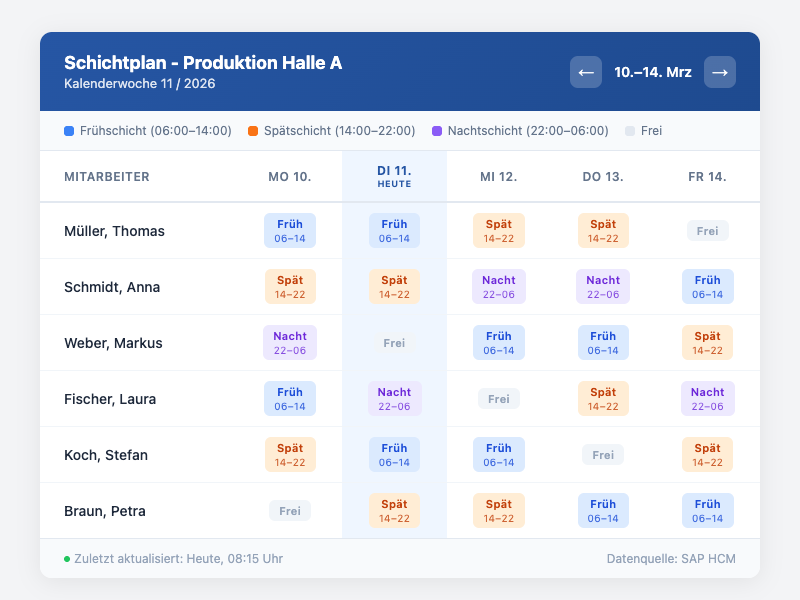
Every Monday the same routine: print the new shift roster, pin it to the notice board, send it by email — and by Wednesday people are still asking when their early shift starts next week. In manufacturing plants, warehouses, and hospitals, distributing shift schedules consumes a surprising amount of energy on both sides.
The Staffbase Shift Schedule Widget changes that.
The Problem: Shift Schedules Don’t Reach Everyone
In many companies running shift operations, the day-to-day reality looks like this:
- Paper notice board — employees who are working from home or off sick miss the update
- Excel file by email — sent to many, outdated the moment the first correction is made
- Verbal communication — error-prone and undocumented
- No central access point — frontline workers without a fixed desk have no easy way to check their schedule
The result: questions to supervisors, misread shifts, and in the worst case, staffing gaps.
The Solution: Personalized Shift Schedule in the Intranet
The Staffbase Shift Schedule Widget embeds the roster directly into the Staffbase app. Each employee automatically sees their own schedule — filtered by name, department, or location. No searching, no scrolling.
What the widget shows:
- Weekly overview with all assigned shifts
- Color-coding by shift type (early/late/night)
- Today’s date automatically highlighted
- Colleagues on the same shift visible at a glance
- Recent changes immediately recognizable
Changes in the scheduling system? The app reflects them within minutes — no new file to send, no notice board to update.
Industries Where This Widget Delivers the Most Value
Manufacturing and Production
Early, late, and night shift operations with rotating teams: a clear, mobile-accessible roster isn’t a nice-to-have — it’s operationally essential. The widget replaces the notice board on the factory floor.
Logistics and Warehousing
Warehouse staff often rotate between locations and shifts. The widget gives them their current schedule on their smartphone — even without a desktop workstation.
Retail and Branch Operations
Branch teams with a high share of part-time employees benefit particularly from personalized views: each person sees only their own shifts, not the full branch roster for everyone.
Healthcare
Nursing teams and hospital staff need reliable, up-to-date rosters. The widget can be configured with facility-specific shift terminology and also displays on-call and standby duties.
Technical Integration: Simpler Than You’d Expect
The widget connects via an API to the existing scheduling system. Typical source systems are SAP HCM, ATOSS, Workday, or a SharePoint-hosted Excel file.
The process:
- Identify the interface: Which system manages the shift schedule?
- One-time setup: IT connects the widget to the source system — usually half a day’s work
- Editorial configuration: Layout, color-coding, and visibility rules are managed by the intranet team independently
Employee data stays within your own infrastructure — the widget reads only, no copies, no third-party storage.
More Than a Roster Display
The shift schedule widget measurably increases daily visit frequency in the intranet. Frontline workers who previously had no reason to open the Staffbase app in the morning now do — to check their schedule. Along the way, they see company news, HR announcements, and internal offers.
One widget that creates everyday value makes the entire intranet more relevant.
Next Step
Want to see what a shift schedule widget looks like in your Staffbase environment? We’ll show you the integration options for your scheduling system in a short demo.