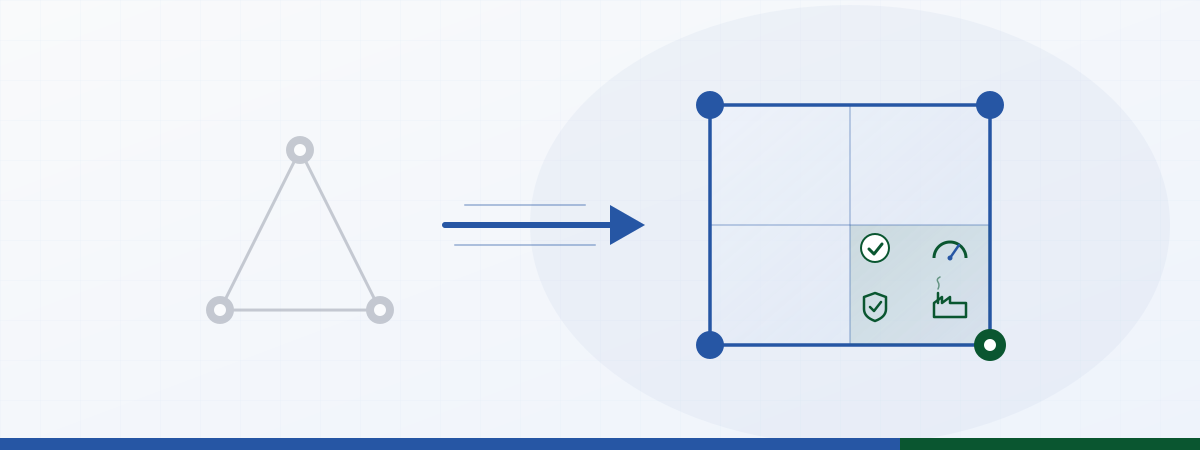
Staffbase Operations isn’t theory anymore in 2026. The fourth pillar is here. For ten years, the Staffbase intranet has run on a triangle: IT owns the platform, HR owns onboarding and self-service, Comms orchestrates internal communication. If you’ve shipped a Staffbase project in the last few years, you know the cast: three stakeholders, clear roles, a predictable roadmap.
In 2026, that triangle becomes a square. Operations moves in, and this isn’t “one more stakeholder,” it’s the structural shift that’s quietly reshaping intranet strategies right now. The teams that read this early gain ground: because Operations use cases are the lever that turns the employee app from a communications channel into a process platform.
What starts as a strategy diagram lands quickly on the plant floor: shift handover signed off in 12 seconds, OEE on the home screen, EHS audit without binders. This article walks through what’s changing structurally, the five new personas you need to map, and what you can already start moving this month, so Operations use cases don’t end up at the bottom of the IT backlog.
Triangle to square: what actually changes?
In the classic model, each corner of the triangle has its own logic:
- IT thinks platform, security, scale. Success metrics: uptime, compliance, total cost of ownership.
- HR thinks employee lifecycle. Success metrics: self-service rate, time-to-productive, engagement index.
- Comms thinks reach and message. Success metrics: open rate, dwell time, campaign KPIs.
That works for an intranet that mostly transports information. It stops working the moment the employee app starts carrying processes. Shift handovers, machine downtime, safety acknowledgments, daily store revenue: those aren’t messages, they’re actions with consequences.
Operations brings a fourth logic into the room:
- Operations thinks process, throughput, downtime. Success metrics: time per handover, downtime minutes, first-time-right rate, audit completeness.
Once that fourth corner shows up, the question changes. It’s no longer “How do we reach all employees with this news?” It becomes: “Which process should run faster, safer, or with fewer errors today, and what needs to happen in the intranet to make that real?”
Why now? Three pressure points
The shift isn’t random. Three forces are converging in 2026:
1. Frontline moves to the front. Care, manufacturing, retail floors, logistics, field service: most of your workforce isn’t sitting at a desk. Until recently, this group was also served. Now it’s the primary audience for many intranet programs because that’s where the engagement gap and the ROI lever both live.
2. Compliance can’t be distributed anymore. Audits, EHS obligations, healthcare data protection, ISO 45001, sector-specific regulations: compliance requirements are migrating out of standalone tools and into “wherever employees already are.” The intranet is the single place everyone touches, so the mandatory workflows land here.
3. Cross-functional scaling becomes the bottleneck. A group with 30 plants and 80,000 employees can’t buy a separate tool for every use case. Consolidation onto the employee platform becomes the default, which means every department needs its use cases living in the place the workforce opens every day anyway.
Three pressure points, one outcome: Operations moves in. And with it, the personas you’ll be selling and designing for change too.
The five new personas you need on the map in 2026
If you’ve been negotiating with Comms, HR, and IT, you’re about to meet a different crowd. They speak a different language, they track different KPIs, they buy on different terms.
Head of Operations / COO Office
The most senior Operations voice in the company. Pain: frontline has no access to process data, Excel islands proliferate, reporting arrives a week late. Wants: consolidation in the intranet without every use case becoming a standalone IT project. Buys: not “engagement,” but “less downtime.”
Plant Manager
Owns one or more plants. Pain: shift handovers are error-prone, KPIs live on a printed sheet, OEE data is locked inside the MES. Wants: live dashboards per plant, handover widgets, escalation paths. Buys: not “reach,” but “less recovery time after information loss.”
Frontline Experience Lead / Digital Workplace Operations
A relatively new role in many enterprises. Bridge between IT and operational departments. Pain: “Staffbase is live, but shop-floor workers aren’t using it.” Wants: use cases that are relevant to the shift. Buys: not “app downloads,” but “task completion rate per shift.”
Quality / EHS Manager
Owns safety, quality, compliance. Pain: audit trails on paper or SharePoint, mandatory acknowledgments without digital evidence, every external audit becomes a multi-week project. Wants: mandatory workflows with audit trails inside the intranet. Buys: not “newsletter reach,” but “audit completeness with no rework.”
Operations IT / Shopfloor IT
A separate IT function alongside corporate IT. Owns MES, SCADA, shop-floor integration. Pain: corporate IT pushes Operations work to the bottom of the roadmap. Wants: a self-service layer that inherits permissions and audit from Staffbase. Buys: not “another tool,” but “ship ourselves without blocking corporate IT.”
A note if you’re sitting in Comms or IT and see this wave coming: these five personas aren’t competitors to your existing stakeholder list. They’re your new allies. Comms opens the door, IT keeps the platform safe, Operations brings the budget for the next wave of use cases. The teams that build their operating model around that win.
What Operations expects from the intranet (and what Comms alone can’t deliver)
Operations use cases are fundamentally different from classic Comms content. Miss this, and you ship “another news tile” and wonder why the plant manager waves you off.
| Dimension | Classic Comms widget | Operations widget |
|---|---|---|
| Content | Message, campaign, update | Action, process step, status |
| Audience | “All employees” | Shift, site, role, asset |
| Update cadence | Days to weeks | Minutes to hours |
| Success metric | Open rate, dwell time | Task completion, Δt, audit rate |
| Data source | Editorial system | MES, ERP, sensors, CAQ, POS |
| Compliance anchor | Image rights, brand | Audit trail, ISO standards, data protection |
An Operations widget isn’t “a better newsletter.” It’s an action surface for a specific process. Shift handover, safety acknowledgment, machine status, store KPI: those aren’t messages, they’re operational touchpoints.
A morning at the plant when the shift lands
So the diagram doesn’t stay in strategy land. Here’s the translation into a normal morning at a plant somewhere between Stuttgart and Poznań:
6:00 AM. The early shift opens the Staffbase app. First item on the home screen: not the CEO letter, but the open items from the night shift. Line 3 acknowledged, Line 4 has a safety note (photo attached). Twelve seconds later the shift lead has taken over the handover, with audit trail, user ID, and timestamp.
9:30 AM. OEE on Line 2 drops below 60 %. The asset-status widget escalates automatically to the plant manager and the continuous-improvement lead, via push, not email. Response time: four minutes instead of twenty-three.
2:00 PM. The EHS manager checks the safety-acknowledgment widget ahead of next week’s audit visit: 96 % of mandatory training acknowledgments signed off, with audit trail. No SharePoint list, no binders.
Same day, same app, three personas. That’s the shift: strategy diagram meets shop-floor morning. And that’s exactly why widgets need to go beyond what standard Staffbase ships.
Where standard widgets stop being enough
Staffbase ships a strong baseline: news feed, employee directory, search, push notifications, forms, basic dashboards. For your first Operations use case, that often does the job. By the second or third, you’ll hit walls:
- Mandatory fields per shift type: standard forms aren’t shift-aware.
- Connections to MES, CAQ, ERP modules, Power BI: standard widgets are content widgets first.
- Role, location, and language variants in a single widget: standard solutions force multi-maintenance.
- Audit trails with user ID, timestamp, geo, photo attachment: standard forms aren’t an audit system.
- Live dashboards refreshing every few seconds: news modules don’t update like that.
That’s where the Widget Builder comes in. This is the moment to make differentiation explicit, before someone asks: “Aren’t you doing the same as an SI partner?” Three points to land:
What standard Staffbase explicitly doesn’t cover, one example. Try this with a standard forms widget: if the mandatory field “tool number” is relevant for shift A but should stay empty in shift B, you need two forms. Two maintenance flows, two version states, two sets of language variants. Across three plants, that’s six. This is where it becomes obvious: standard widgets are content widgets, not process widgets.
Why not a custom development partner. A classic custom widget at an implementation partner: 8 to 12 weeks, 40 to 80k €, then onto the maintenance contract. Across ten Operations use cases, that’s half a million euros for components that need quarterly tuning. The quarterly tuning is exactly the point at which custom development tips over: maintenance load eats up the initial value.
What Widget Builder concretely does differently. Content stewardship by Operations themselves, not an IT ticket. Change an escalation threshold, add a language variant, add a new asset to the picklist: that happens during the Frontline Experience Lead’s coffee break, not in IT sprint 14. Permissions, data protection, and branding are inherited from Staffbase. No parallel rights management, no third-country data review for the widget layer.
If you want to go deeper into the actual use cases, see 5 Operations use cases beyond standard widgets . For the manufacturing focus, see Shift handover in the intranet . And if “why isn’t anyone using it?” is on your desk right now, see Frontline adoption .
The new operating model: Operations × Comms
With Operations as the fourth pillar, the question of who owns which use case changes. Three models are emerging in 2026:
Model A: Comms as central editorial. Works for news-driven intranets, but collapses the moment Operations wants 20 use cases. Comms isn’t built for use-case sponsorship at the process layer.
Model B: Editorial board with use-case sponsorship. Quarterly sponsorship calls: each department pitches use cases, a joint editorial board (Comms lead, Operations rep, IT architecture) prioritizes. Comms keeps standards, branding, tone. Operations owns the use cases.
Model C: Center of Excellence for intranet widgets. A small dedicated crew (2-4 people) acting as internal consulting. Use-case intake, widget design, rollout support, training for departments. Scales for groups with 50+ use cases per year. A dedicated deep-dive on the CoE model is coming in the next wave of this series.
Which model fits depends on your size, maturity, and the number of Operations use cases on the table. Most groups travel A → B → C, and that journey is exactly why 2026 is the year many enterprises rebuild their intranet operating mode.
Three phases to start with
If you’re moving to the square model in 2026, the pragmatic path runs in three phases:
Phase 1: Validation (4-6 weeks). Pick three to five Operations use cases with sharp pain. One per branch/function: shift handover (manufacturing), safety acknowledgment (EHS), store KPI (retail). Choose a pilot plant or pilot store, build the widget, ship it in two weeks, gather feedback. Goal: one lighthouse per use-case type.
Phase 2: Scaling (3-6 months). Pilot use cases turn into templates. Language variants, location variants, role variants. Plant or store two and three, then rollout to 80% of the workforce. In parallel: lock the operating model, set up the editorial board, build a six-month use-case pipeline.
Phase 3: Industrialization (month seven onwards). Stand up the Center of Excellence, standardize use-case templates, pre-configure MES/ERP/CAQ connections. Track Operations-level KPIs (Δt per handover, audit completeness, OEE visibility), not just app engagement.
This isn’t a 12-month plan you run once. It’s an operating mode in which Operations use cases keep flowing because the platform and the operating model are built for it.
What changes for each stakeholder
When you sell this internally, it helps to translate the change per stakeholder:
- For IT very little changes technically: Staffbase stays, permissions stay. What changes: more data sources are connected (MES, CAQ, BI), more departments become users. Architecture decision: central integration layer or per-use-case?
- For HR new content types arrive that don’t sit on the classic HR tree: shift handovers, EHS acknowledgments. HR has to decide: co-own them or hand ownership to Operations?
- For Comms the role shifts from “sender” to “standard-setter.” Editorial standards, tone, brand stay with Comms. Use-case content moves to Operations.
- For Operations a door opens that was previously closed: a channel into the workforce without every use case becoming a separate tool. This is often underestimated, and it’s the exact pitch that wins your Operations sponsor.
Frequently asked questions
Does this mean Comms loses influence?
The opposite. Comms becomes the standard-setter for every use case: tone, brand, editorial quality. Setting standards in the editorial board carries more influence than being the sole sender. Operations owns content; Comms owns platform consistency. Both are needed.
Do we need a dedicated Operations IT, or is corporate IT enough?
Depends on size and complexity. Groups with 10+ plants or multi-banner retail benefit from a dedicated Operations IT role, because shop-floor requirements behave differently from office IT (real-time, uptime, ruggedized hardware). Smaller setups can stay with central IT, provided IT doesn’t push Operations to the bottom of the roadmap.
How do we stop every department from building their own widget?
Editorial board with standards plus a central widget catalog. Use-case intake runs through a single process (pain → concept → mockup → pilot → rollout). Standards for naming, permissions, language variants prevent sprawl. A Center of Excellence makes sense as soon as use-case volume scales.
What about existing custom widgets from earlier projects?
Inventory them, score the maintenance load, identify migration candidates. Typical pattern: 60-70% of existing custom development can be replaced with a low-code layer, with significantly less maintenance effort. The remaining 30-40% stay custom because they carry very specific backend logic.
How do we measure success in the new model?
Three layers in parallel:
- Platform KPIs (DAU, MAU, push open rate): unchanged.
- Use-case KPIs per Operations widget (task completion rate, Δt per transaction, audit completeness): new.
- Business KPIs at the process level (OEE visibility, downtime recovery time, EHS audit rate, store-KPI response time): the actual ROI story.
Vanity metrics like raw app logins aren’t enough anymore. Operations sponsors expect process-level impact.
Isn’t standardization risky? Every site behaves differently.
Standardization happens at the template level, not the field level. The shift-handover template is identical everywhere; mandatory fields, language variants, and attachments are configurable per plant. That gets you architectural consistency and operational flexibility.
When does the Widget Builder make sense concretely?
Three triggers that make the entry point pay off:
- You have an Operations use case with ≥ 200 frontline roles that standard Staffbase can’t cover.
- You have 3 or more use cases on the list for the next six months that would otherwise each run as separate custom development projects.
- Compliance density (ISO 45001, IATF, FDA) is rising: you need audit trails, not SharePoint lists.
If any of the three triggers applies, Phase 1 (4-6 week validation) is the right next step.
And when is the Widget Builder not the answer?
Three scenarios where we tell people to wait:
- Single-location setups under 200 employees. The setup effort doesn’t pay off. Standard Staffbase plus a SharePoint list is enough.
- Use cases that write deep into the ERP backend (e.g. inventory bookings, creating production orders). That’s custom development territory, not a low-code use case.
- When Comms sees the intranet purely as a newsletter tool and Operations has no sponsor. Without an Operations sponsor you can build widgets nobody opens.
If one of those applies, tell us at the first call. We both lose time if that’s the situation.
Next step
Teams that approach Staffbase Operations 2026 structurally now build a real lead: on frontline adoption, on compliance certainty, and on the speed at which the next use case ships. Three ways to keep going:
You have a concrete Operations use case on your desk. Ping us on LinkedIn (JASP) with a 2-sentence brief (“Plant X, use case Y, planned rollout Z”). We’ll respond inside one working day and sketch in a 30-minute walkthrough how the use case would ship in Widget Builder.
You want to browse first.
- Widget gallery : 40+ pre-built widgets, many of them Operations-ready (e.g. shift schedule , charts dashboard , pulse check )
- Widget Builder in detail : how the low-code layer actually works
- Pricing : when the entry point starts paying off
You want to go deeper on individual topics.
- 5 Operations use cases beyond standard widgets : listicle with concrete widget patterns
- Shift handover in the intranet : manufacturing deep-dive with ROI table
- Frontline adoption : when “why isn’t anyone using it?” is on your desk
Contents
Related Articles
Frontline Adoption in the Intranet: Why the Shift Isn't Using It
28.04.2026Digital Shift Handover: From Clipboard to Live Hand-off in the Intranet
28.04.2026Operations Use Cases for the Intranet: 5 Patterns Beyond Standard Widgets
28.04.2026Staffbase Shift Schedule Widget: Rosters in Your Intranet
13.04.2026