Recognition programs fail because of friction. The classic: a separate tool, a separate login, a form with eight fields, manager approval – and in the end, nobody sends kudos anymore, except once per quarter in a forced action.
The Kudos Wall flips the equation: three fields, one click, visible to everyone. Right on the intranet homepage, no login, no approval.
Three fields, one click
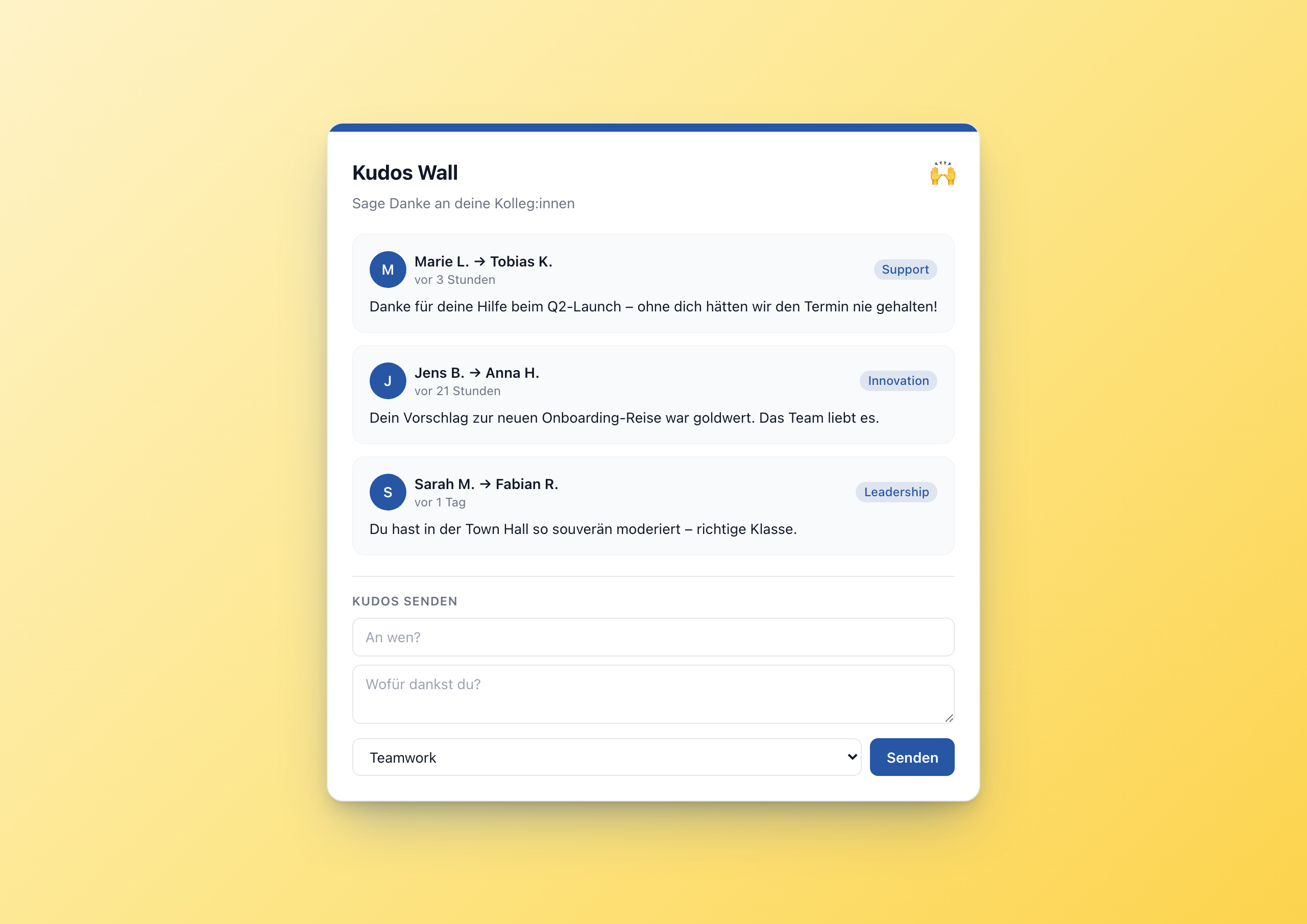
The Kudos Wall has two areas: at the top, the last N recognitions as cards with initials avatars, “sender → recipient” and a colored category badge. At the bottom, a compact form: recipient, message, category. The sender is filled automatically from the Staffbase user context – no typing.
Click “Send”, and the new recognition appears at the top of the list a second later.
Architecture: Data Table as backend
The pattern is always the same: end users do not write to settings or variables. End users write to a Data Table. This pattern is the clean architecture for any widget with runtime user data – kudos, submitting an idea, booking.
For the Kudos Wall, this means concretely:
- Create a Data Table in the Widget Builder with five columns:
from_name,to_name,message,category,submitted_at - Copy the table GUID
- Paste it into the editor setting
tableGuid
On page load, the widget reads the table (sorted by submitted_at desc, top 50) and shows the first N entries. On submit, it makes a POST to the Data Table endpoint:
 1await fetch('/api/data-table-widget/' + tableGuid + '/rows', {
 2  method: 'POST',
 3  headers: {'Content-Type': 'application/json'},
 4  body: JSON.stringify({data: {
 5    from_name: '{{user.firstName}} {{user.lastName}}',
 6    to_name: recipient,
 7    message: message,
 8    category: category,
 9    submitted_at: new Date().toISOString()
10  }})
11});
Three lines of submit logic – that’s all it takes.
The user context as sender
The Widget Builder injects a user context with user.firstName, user.lastName, user.email etc. into the template by default. In the widget’s JavaScript I read the sender name from it:
1var fromName = ('{{user.firstName}} {{user.lastName}}').trim() || 'Anonymous';
Nobody types their name, nobody can mistype. That’s the main difference between a widget in the intranet and an external recognition tool: the widget knows who you are.
Five categories – no more
Teamwork, Leadership, Innovation, Support, Impact. Five is enough. More categories lead to decision paralysis (“Is this teamwork or support?”) and the analysis gets fuzzy. The five cover 95% of all real recognition occasions.
The category badges take the widget’s accent color at 12.5% opacity – a trick with the +20 at the end of the hex code that works in modern CSS engines. Result: the badges blend seamlessly into the branding without anyone needing a separate palette.
Localized “X hours ago”
A recognition from yesterday reads differently than one from 5 minutes ago. The datetime helper does this automatically:
1{{datetime from_iso=this.submitted_at to_relative=true with_locale=widget.contentLanguage}}
In English: “3 hours ago”. In German: “vor 3 Stunden”. No line of JavaScript, no external library.
When to use this widget
- Establish a recognition culture – recognition as a daily ritual instead of an annual event
- Onboarding companion – new colleagues experience a recognition culture from day 1
- Cross-team recognition – say thanks across department boundaries
- Manager coaching – managers see directly which of their team members are shining
Try it in the gallery
Setup steps and all settings are in the Kudos Wall gallery entry .
Related widgets
- Idea Box – crowdsourcing with the same Data Table architecture
- OKR Tracker – team goals with progress and status
- Anniversaries Widget – automatic anniversary recognition